Addressable RGB
Addressable RGB (also known as ARGB or Digital RGB, DRGB) is a standard RGB interface used by a wide variety of PC components, light strips, motherboards, and controllers. It consists of a 3-pin connector which provides power and data and is capable of controlling each LED on the device with its own unique color value.
Addressable RGB LEDs work in a "daisy chain" configuration where the data signal goes from the controller
into the first LED, then to the second LED, then to the third, and so on. As this interface is only capable
of sending data in one direction, OpenRGB is unable to automatically determine how many LEDs are in the
chain for any given device or chain of devices. Therefore, it is required that you manually configure
the number of LEDs for each ARGB output in OpenRGB before you can control the attached LEDs. This process
is called "resizing".Resizing Addressable RGB Zones in OpenRGB
There are two methods for configuring the number of LEDs on an addressable header in OpenRGB. The first method is presented upon opening OpenRGB for the first time with an addressable RGB controller or motherboard present. The interface looks like this:
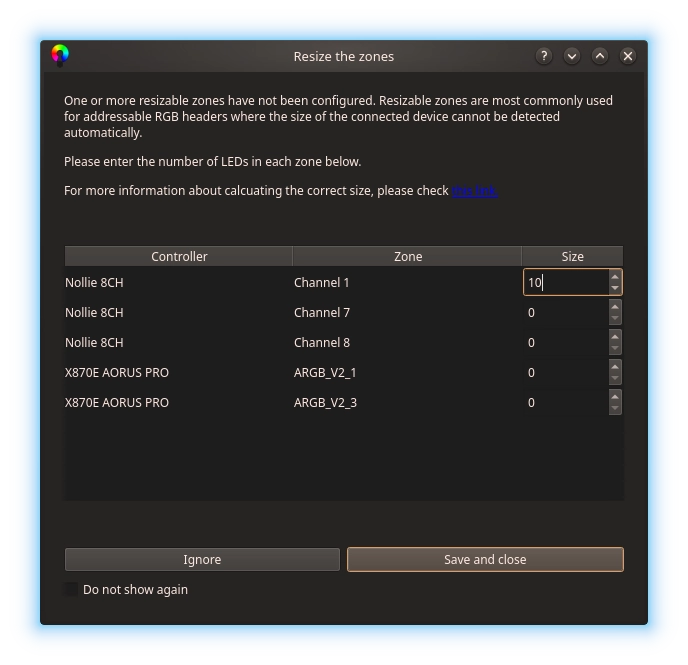
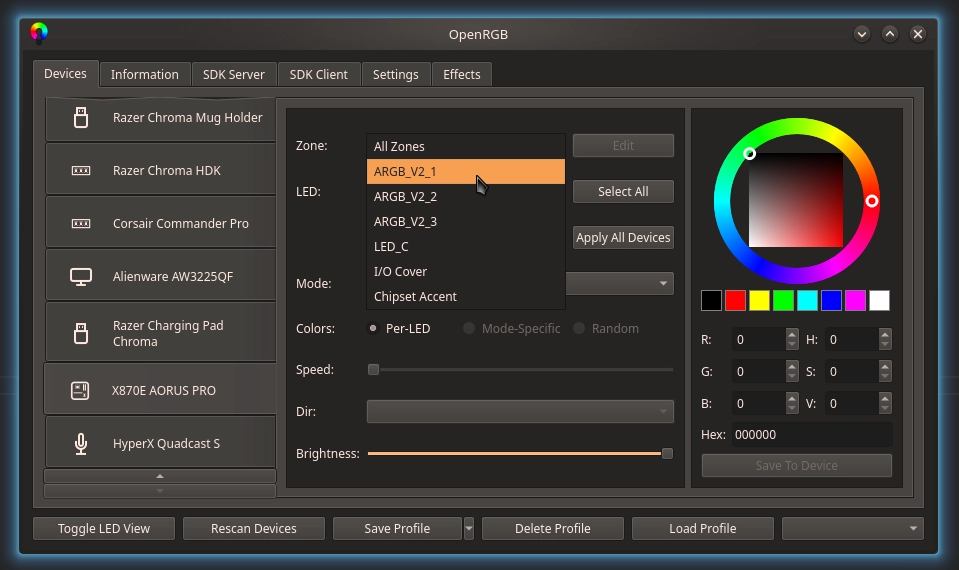
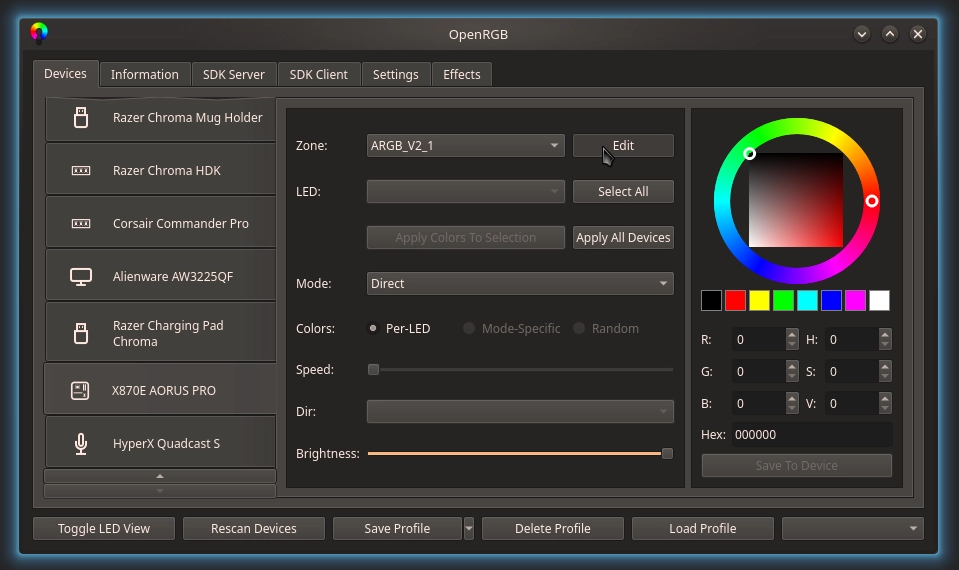
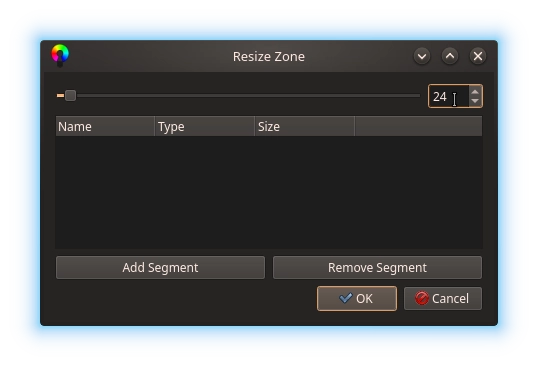
The second method can be accessed at any time. It involves selecting the Zone that corresponds to a given ARGB output in the Zones selection box and then clicking the Edit Zone button. This opens a new menu that allows you to enter the zone size (LED count) as well as perform additional customization such as defining segments. Segments can be used to divide up a zone into smaller sections for more flexibility.
Note on RGB Hubs
Most common RGB hubs, splitters or cables will just dupilcate the signal (putting all elements in
parallel). When setting up the size of the elements, it will be ideal for all strings to be the same
length so ARGB effects will wrap at the same time.Calculating Length of Chained Elements
Some elements like fans and LED strips can be chained together to create one long strip. To calcuate
the length, add up the number of LEDs in each individual element. If using all elements of the same
type, mutiply the number of LEDs per element by the number of elements in the chain.List of Common RGB Fan LED Counts
| Vendor | Fan | LED Count | Chain | Connector |
|---|---|---|---|---|
| Cooler Master | MF120 Halo | 24 | Parallel | ARGB 3-Pin |
| Cooler Master | MF140 Halo | 24 | Parallel | ARGB 3-Pin |
| Corsair | LL120 | 16 | Series | Corsair (Molex SL) |
| Corsair | LL140 | 16 | Series | Corsair (Molex SL) |
| Corsair | ML120 | 4 | Series | Corsair (Molex SL) |
| Corsair | ML140 | 4 | Series | Corsair (Molex SL) |
| Corsair | QL120 | 34 | Series | Corsair (Molex SL) |
| Corsair | QL140 | 34 | Series | Corsair (Molex SL) |
| Lian-Li | Bora Digital | 12 | None | JST SM |
| Lian-Li | UNI Fan SL120 | 16 | Series | UNI Fan (JST SM 3-Pin) |
| Lian-Li | UNI Fan SL140 | 16 | Series | UNI Fan (JST SM 3-Pin) |
| Lian-Li | UNI Fan AL120 | 16? | Series | UNI Fan (JST SM 3-Pin) |
| Lian-Li | UNI Fan AL140 | 16? | Series | UNI Fan (JST SM 3-Pin) |
| Thermaltake | Pure 12 ARGB | 9 | None | ARGB 3-Pin |
| Thermaltake | Pure 14 ARGB | 9 | None | ARGB 3-Pin |
| Thermaltake | Pure 20 ARGB | 9 | None | ARGB 3-Pin |
| Thermaltake | Pure Plus 12 | 9 | None | Thermaltake 9-Pin |
| Thermaltake | Pure Plus 14 | 9 | None | Thermaltake 9-Pin |
| Thermaltake | Riing Plus 12 | 12 | None | Thermaltake 9-Pin |
| Thermaltake | Riing Plus 14 | 12 | None | Thermaltake 9-Pin |
| Thermaltake | Riing Duo 12 | 18 | None | Thermaltake 9-Pin |
| Thermaltake | Riing Duo 14 | 18 | None | Thermaltake 9-Pin |
| Thermaltake | Riing Trio 12 | 30 | None | Thermaltake 9-Pin |
| Thermaltake | Riing Trio 14 | 30 | None | Thermaltake 9-Pin |
| Thermaltake | Riing Trio 20 | 60 | None | Thermaltake 9-Pin |
| Thermaltake | Riing Quad 12 | 54 | None | Thermaltake 9-Pin |
| Thermaltake | Riing Quad 14 | 54 | None | Thermaltake 9-Pin |
List of Common LED Strip LED Counts
| Vendor | LED Strip | LED Count | Chain | Connector |
|---|---|---|---|---|
| Phanteks | Neon M4 400mm | 28 | Series | JST SM 3-Pin |
| Phanteks | Neon M5 550mm | 38 | Series | JST SM 3-Pin |
| Phanteks | Neon M1 1000mm | 70 | Series | JST SM 3-Pin |